Headings (H1, H2, H3…H6): How to Structure Content for Readability & SEO
Headings (H1, H2, H3…H6) are HTML elements that structure web content by defining sections and sub-sections. They create a clear hierarchy, making it easier for users to scan and understand the information on a page. Each heading level serves a specific purpose, with H1 representing the main topic and subsequent headings breaking content into logical segments.
Key takeaways
- Heading tags (H1-H6) define a page's structure: H1 is the main topic, H2s are major sections, H3-H6 break those down further.
- Use one descriptive H1 with the primary keyword, and do not skip levels such as jumping from H2 to H4.
- Put keywords and natural variations in headings for clarity, never stuffing, and keep each heading short and specific.
- Good headings help screen reader users and improve featured snippet chances when a direct answer follows a question heading.
- AI Overviews and AI Mode lift passages that sit under clear question headings, so open each section with a self-contained answer.
Proper heading usage improves readability and SEO by helping search engines understand content structure and relevance. Well-organized headings enhance user experience (UX) by guiding readers through key points and effectively assisting search engines in crawling and indexing pages.
Importance of Headings in SEO & Readability

Headings play a crucial role in user experience (UX) and search engine optimization (SEO) by structuring content logically and readably. By breaking content into sections, headings make long-form text easier to scan, allowing users to quickly find relevant information without reading every word.
From an SEO perspective, headings help search engines interpret page structure and determine the relationship between sections. Properly formatted headings enhance indexing, improve ranking potential, and contribute to better featured snippet visibility. Additionally, a well-structured heading hierarchy improves accessibility, making content more navigable for users relying on screen readers.
How do Search Engines Interpret Headings?
Search engines like Google analyze heading tags to understand content structure and relevance. Headings create a hierarchy that helps search engines determine the main topics of a page, influencing how content is indexed and ranked.
Google scans heading tags to assess their semantic importance during crawling and indexing. The H1 tag signals the primary topic, while the H2-H6 tags define supporting subtopics. A well-structured heading hierarchy ensures that search engines correctly interpret relationships between sections, improving the page’s SEO performance and chances of ranking for relevant queries.
H1 Tag: Primary Heading and Best Practices

The H1 tag is the most important heading on a webpage, representing the content’s main topic. The title tells users and search engines what the page is about. Since search engines use the H1 to understand content relevance, it is key in SEO ranking.
Why Should There Be Only One H1 Per Page?
A single H1 tag ensures a clear content hierarchy, preventing confusion for search engines. Google does not penalise multiple H1s, but they blur the page’s main topic for readers and screen reader users.
Best Practices for Writing an Optimized H1 Tag
- Keep it short enough to read at a glance; there is no character limit for an H1 (the 50-60 character guideline applies to the title tag).
- Include primary keywords naturally without stuffing.
- Make it unique for every page.
- Ensure it aligns with user intent and content focus.
Examples of Strong H1s That Improve SEO
✔️ “Best Practices for Writing SEO-Friendly Blog Titles”
✔️ “How to Optimize Your Website for Higher Rankings”
✔️ “A Complete Guide to Understanding Heading Tags”
H2-H6: Structuring Subheadings Correctly
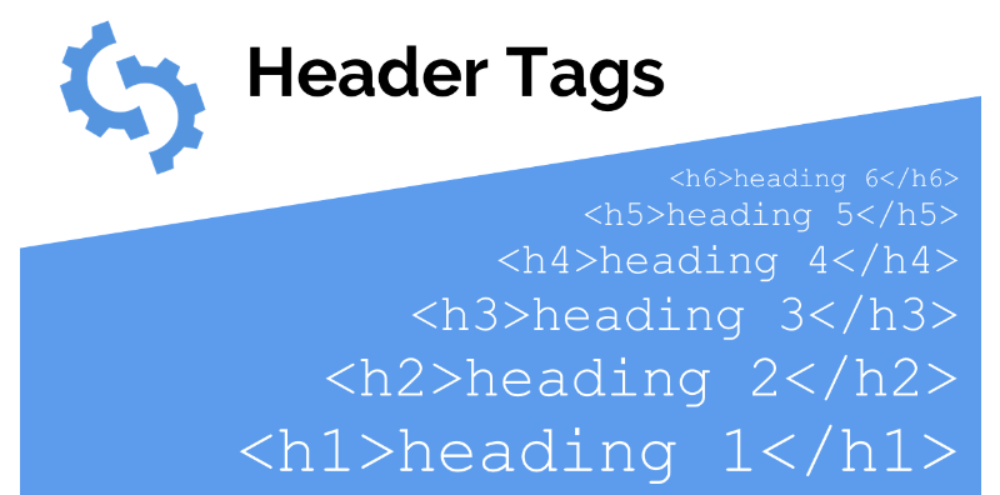
Headings H2 to H6 are vital in organizing content by breaking it into structured sections. A well-implemented heading hierarchy enhances readability, improves user navigation, and helps search engines understand content relationships.
Role of H2-H6 Tags in Content Organization
- H2 represents major sections of the content, acting as chapter titles.
- H3-H6 function as subheadings, further breaking down information within an H2 section.
- Proper usage creates a logical flow, making content easier to scan and process.
How to Create a Logical Heading Hierarchy
- Start with H1 as the main topic of the page.
- Use H2 for major sections and H3-H6 for subtopics under each section.
- Follow a nested structure, ensuring that subheadings remain within their parent heading.
Avoiding Skipped Heading Levels (H2 > H4 Mistakes)
- Do not jump from H2 to H4 without an H3 in between.
- Skipping levels can disrupt content hierarchy, making it difficult for users and search engines to interpret the structure.
Using Subheadings to Improve Content Flow and Engagement
- Subheadings break up long-form content, making it more digestible.
- Proper heading use guides readers naturally, increasing time on the page.
- Helps highlight key takeaways and improve search snippet visibility.
Best Practices for Using Headings
Effective use of headings improves content readability, SEO, and user engagement. By structuring headings correctly, content becomes easier to scan while maintaining clarity for users and search engines.
Using Headings to Guide Readers Naturally
- Headings should reflect content structure and help users navigate the page easily.
- Each heading should introduce the topic of its section concisely.
- A well-structured heading hierarchy ensures logical content flow.
Avoiding Keyword Stuffing in Headings
- Use keywords naturally, avoiding forced or repetitive phrasing.
- Prioritize readability over SEO manipulation.
- Overusing keywords in headings can negatively impact rankings.
Keeping Headings Short, Clear, and Relevant
- Keep headings short enough to scan in one glance, usually under ten words.
- Avoid vague or generic headings (e.g., “Important Information”).
- Ensure each heading accurately represents its section’s content.
Ensuring Proper Spacing and Alignment of Headings
- Maintain consistent formatting across the content.
- Headings should be visually distinct to enhance readability.
- Proper spacing and indentation improve user experience and accessibility.
Headings and Keyword Optimization
Optimizing headings with strategically placed keywords enhances SEO performance while maintaining readability. Proper keyword integration helps search engines understand content relevance without affecting user experience.
How to Naturally Integrate Keywords in Headings
- Use primary keywords in H1 and H2 tags without forcing them.
- Place long-tail keywords in H3-H6 subheadings for deeper topic coverage.
- Ensure headings remain readable, avoiding unnatural phrasing.
- Write descriptive yet concise headings that match search intent.
Related Terms and Synonyms in Headings
- Related terms and synonyms (often called LSI keywords, although Google does not use LSI) help create contextually relevant headings.
- Instead of repeating the same keyword, use synonyms and variations.
- Example: Instead of using “SEO Heading Optimization” repeatedly, alternate with “Optimizing Headings for Search Visibility”.
- Enhances content relevance, making it more comprehensive for search engines.
Common Mistakes When Using Keywords in Headings
- Keyword stuffing makes headings look unnatural and hurts readability.
- Forcing exact-match keywords disrupts the content flow.
- Using generic headings that lack descriptive value (e.g., “SEO Guide” instead of “How to Optimize Headings for SEO”).
- Ignoring user intent leads to misleading or irrelevant headings.
Headings and Content Accessibility
Headings play a crucial role in web accessibility, helping users with visual impairments navigate content using screen readers. Proper heading structure ensures a logical reading order, making digital content more inclusive.
Why Headings Matter for Screen Readers
- Screen readers rely on headings to announce sections, allowing users to jump between topics easily.
- Poor heading structure disrupts navigation, making content harder to understand.
- Using headings correctly improves user experience (UX) for individuals relying on assistive technology.
WCAG Guidelines for Heading Structure
- Follow Web Content Accessibility Guidelines (WCAG), maintaining a logical heading hierarchy (H1 to H6).
- Use H1 for the main topic and subsequent headings (H2-H6) for supporting information.
- Ensure headings are descriptive and provide clear context.
Using ARIA Attributes for Better Accessibility
- ARIA (Accessible Rich Internet Applications) attributes help improve heading interpretation for screen readers.
- Example: Using role=”heading” and aria-level=”1″ to define heading importance when native <h1>-<h6> elements are unavailable.
- Helps users better understand page sections, even in complex layouts.
Testing Headings for Screen Reader Compatibility
- Use screen reader software (e.g., NVDA, JAWS, or VoiceOver) to test how headings are read aloud.
- Check navigability by ensuring screen readers can jump between headings correctly.
- Verify that all headings follow a clear structure, avoiding missing or misused heading levels.
Common Mistakes in Heading Usage
Improper use of headings can negatively impact SEO, readability, and user experience. Common mistakes often result in confusing content hierarchy, making it difficult for search engines and users to navigate the page effectively.
Overusing H1 Tags or Having Multiple H1s
- Each page should have only one H1 tag representing the primary topic.
- Multiple H1s are not a penalty, but they weaken the outline of the page for users and search engines.
- Example of incorrect usage:
❌ <h1>SEO Guide</h1>
❌ <h1>Best SEO Practices</h1>- Instead, use H2-H6 for subtopics to maintain the hierarchy.
Skipping Heading Levels (e.g., H2 to H4)
- Headings should follow a logical order (H1 > H2 > H3 > H4…).
- Skipping levels (e.g., jumping from H2 to H4 without an H3) disrupts the content structure.
- Example of incorrect usage:
❌ <h2>SEO Basics</h2>
❌ <h4>Keyword Research</h4> (missing H3)
Using Generic, Unclear, or Duplicate Headings
- Avoid vague or repetitive headings that do not add value.
- Example of generic headings:
❌ <h2>Introduction</h2> (without context)
❌ <h3>More Information</h3> (not descriptive) - Instead, make headings specific and meaningful:
✅ <h2>What Is SEO and Why Does It Matter?</h2>
Not Aligning Headings with Content Intent
- Headings should accurately reflect the topic of each section.
- Misleading headings make readers leave quickly and damage trust in the page.
- Example of incorrect alignment:
❌ <h2>How to Write Meta Descriptions</h2> (but the section is about keyword research).
How to Optimize Headings for Featured Snippets
Properly structured headings increase the chances of appearing in Google’s featured snippets, which display concise answers at the top of search results. Optimizing headings for snippet visibility improves SEO rankings, click-through rates (CTR), and user engagement.
Structuring Headings for Answer-Based Queries
- Use question-based headings (e.g., “What Is an H1 Tag?” or “How Do Headings Improve SEO?”).
- Keep headings clear, direct, and informative to align with search intent.
- Structure content to provide concise answers immediately after the heading.
Question Headings and FAQ Schema: What Google Shows Now
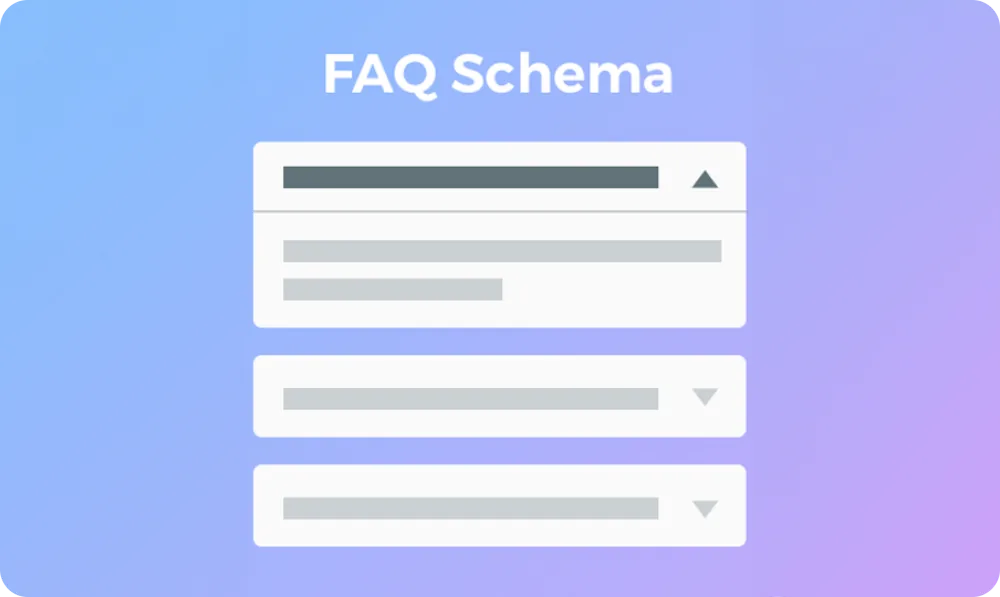
- Apply FAQ schema markup to headings used for common user questions.
- Example:
<h2>How Do Headings Affect SEO?</h2>
<p>Headings improve readability, content structure, and search engine ranking by defining sections and subtopics.</p>
- Google prioritizes well-structured FAQs for featured snippets.
Formatting Headings to Improve Snippet Visibility
- Use H2 or H3 for key questions that users search for.
- Place short, direct answers immediately below headings (40-60 words).
- Use bullet points and numbered lists for step-by-step content.
Examples of Heading Structures That Appear in Featured Snippets
✔ Question-Based Snippet:
H2: “What Is an SEO-Friendly Heading?”
- Answer: “An SEO-friendly heading is a structured tag (H1-H6) that improves readability and helps search engines understand content.”
✔ List-Based Snippet:
H2: “How to Structure Headings for SEO”
- H3: “1. Use a single H1 per page”
- H3: “2. Keep headings concise and keyword-rich”
- H3: “3. Follow a logical H2-H6 hierarchy”
By optimizing headings with proper formatting and structured answers, content is more likely to appear in featured snippets, increasing visibility and organic traffic.
Headings and AI Overviews
The strongest reason to write clear headings now is Google's AI Overviews and AI Mode, both of which show in Pakistan. These answers are assembled from passages on indexed pages, and the passages they lift tend to sit directly under a heading that matches the question asked. ChatGPT-style assistants that search the web behave the same way.
That changes how each section should be written:
- Make the heading the question. "How Much Does a Website Cost in Pakistan?" is far more likely to be quoted than "Pricing".
- Answer in the first sentence or two. Give a self-contained answer of roughly 40 to 60 words under the heading before adding detail, so the passage makes sense on its own.
- One idea per section. If a section covers two questions, split it under two headings.
- Keep facts specific and dated. AI answers favour concrete figures, steps and dates over vague claims, and they cite the page they came from.
You can see which pages are being used: in Google Search Console, pages cited in AI Overviews count as impressions and clicks in the normal Performance report, so a page with rising impressions but flat clicks is often being quoted on the results page.
How to Check and Fix Your Heading Structure
Many heading problems are caused by the theme or page builder, not the writer, so it is worth checking what the live page actually outputs.
Ways to see your headings
- Browser extension: free extensions such as HeadingsMap or an SEO toolbar show the full H1-H6 outline of any page in one click.
- View source or Inspect: search the page source for
<h1to count how many H1s the page really has. - Site crawler: Screaming Frog or a site audit tool in Semrush lists pages with missing, duplicate or multiple H1s across the whole site. Our free on-page SEO checker shows the heading outline of a single page.
Common causes and fixes
| Problem | Likely cause | Fix |
|---|---|---|
| Logo or site name is an H1 on every page | Theme header template | Change the logo to a plain element in theme settings or the header template |
| Two H1s on a page | Elementor or another page builder adds its own heading widget as H1 while the theme already prints the page title | Set the builder's heading widget to H2, or hide the theme title for that template |
| No H1 on the page | Page title hidden by the builder | Show the page title or add an H1 block at the top |
| Sidebar or footer widgets use H2-H4 | Widget title defaults | Switch widget titles to paragraph text or a lower heading level |
| Headings chosen for size | Styling with heading blocks | Use the correct level and adjust font size with CSS |
After fixing the template, recheck a few different page types (home, blog post, product or service page), since each can use a different layout.
Frequently asked questions
Are heading tags a ranking factor?
Headings are not a strong standalone ranking factor, but they help Google understand what each section of a page is about. Clear headings that match search queries make it easier for a page to rank for related terms and to be picked for featured snippets and AI Overviews. Their bigger effect is on users: scannable pages keep readers engaged, which supports the page's overall performance.
Should the H1 be the same as the title tag?
It does not have to be identical, but both should describe the same topic and include the primary keyword. Many sites use a slightly shorter title tag with the brand name at the end, and a fuller, more reader-friendly H1 on the page. Keeping them closely aligned also makes Google less likely to rewrite your title in search results.
Can I use heading tags just to make text bigger?
No. Headings should describe the structure of the content, not its style. Using an H2 or H3 only to enlarge a sentence confuses screen readers and gives search engines a misleading outline of the page. If you need larger or bolder text, change the font size with CSS or your page builder's text settings instead.
How many H2 tags should a page have?
There is no fixed number. Use one H2 for each major section a reader might want to jump to. A short product page may need two or three, while a long guide may need ten or more. If a section runs very long without a subheading, break it up with H3s so readers and search engines can follow the structure.
Does FAQ schema still get rich results in Google?
Only for a few sites. Google removed FAQ rich results for all sites in May 2026 (after limiting them to government and health sites in 2023), and it removed How-To rich results entirely. FAQ markup is still valid structured data and does no harm, but a marketing blog or business site will not get the expandable questions under its listing. Write clear question headings with direct answers instead; those help featured snippets and AI Overviews with or without schema.