YouTube Channel Monetization Checker Chrome Extension: Your All-in-One Toolkit for Channel Analysis
Suppose you are a YouTube content creator, an agency, or a researcher seeking a highly effective toolkit that saves you hours each day. The YouTube Monetization & SEO Insights Chrome Extension is the perfect solution for you. This extension streamlines tracking YouTube channel monetization statuses, offering an easy, quick way to assess whether competitors’ videos are eligible for ads—and now it unveils hidden SEO secrets.
Key takeaways
- The extension shows whether a YouTube channel appears monetized, right on the channel or video page.
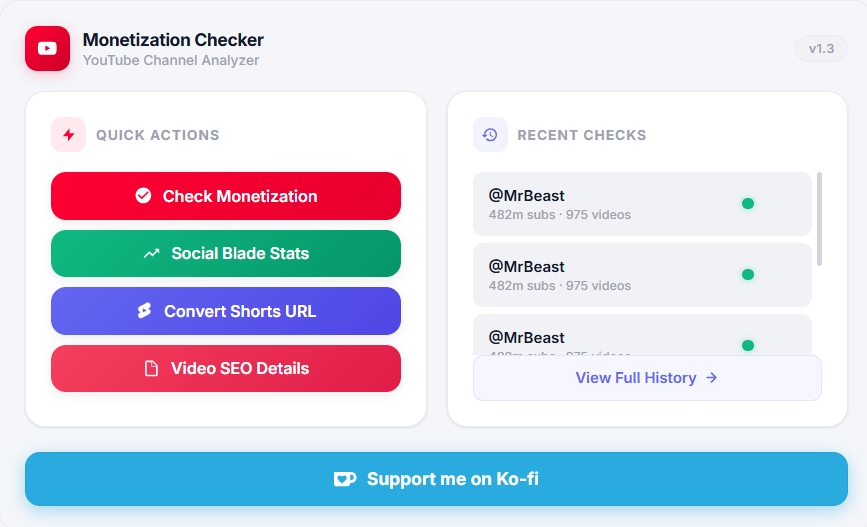
- It also extracts video tags and titles, converts Shorts links, opens Social Blade and lists upload history.
- Monetization status comes from public page signals, so treat it as a strong indicator, not an official YouTube record.
- Tags play only a small role in YouTube discovery; titles, thumbnails and viewer satisfaction matter more.
- It is useful for competitor research, influencer vetting and spotting content patterns.
Why You Need It
Checking monetization status and optimizing video algorithms can be tedious, especially if you’re managing multiple accounts or researching competitors. This Chrome Extension simplifies the process by instantly showing whether a channel is monetized and which keywords it uses to rank. It helps you quickly get the data you need without hassle. Instead of:
- Clicking through endless menus to find whether ads are enabled.
- Digging into the page source code to find hidden video tags.
- Scrolling endlessly to convert Shorts URLs to regular formats or viewing channel history.
- Opening extra tabs for Social Blade or other analytics sites.
This all-in-one toolkit streamlines all of this in one place—no more tab-hopping or guesswork.
Key Features of YouTube Monetization Checker Extension at a Glance
1. Video SEO Details Extractor
Instantly extract the hidden SEO tags, short descriptions, and exact titles used by any YouTube video. Perfect for SEO research, optimizing your own content, and reverse-engineering how top videos rank in the YouTube algorithm.
2. Instant Monetization Status Checker
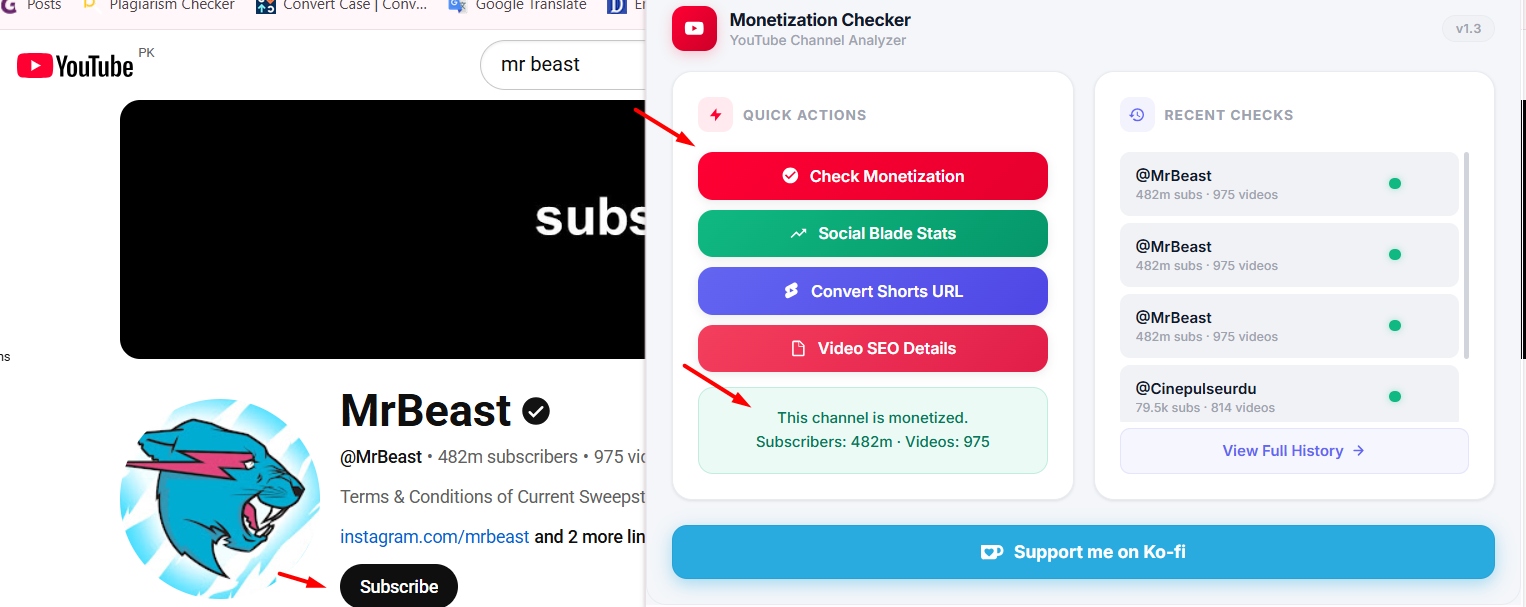
With just one click, you can quickly check if a YouTube channel is monetized. No waiting, no complicated steps, just instant access to know which creators are running ads and which ones aren’t.
3. Shorts-to-Long Video Converter
Tired of hunting for a channel’s longer content when you’re stuck on a Shorts URL? Click the “Convert Shorts” button and voilà: you’re whisked straight to the corresponding long-form video (if available), saving you from endless scrolling.
4. Seamless Social Blade Integration
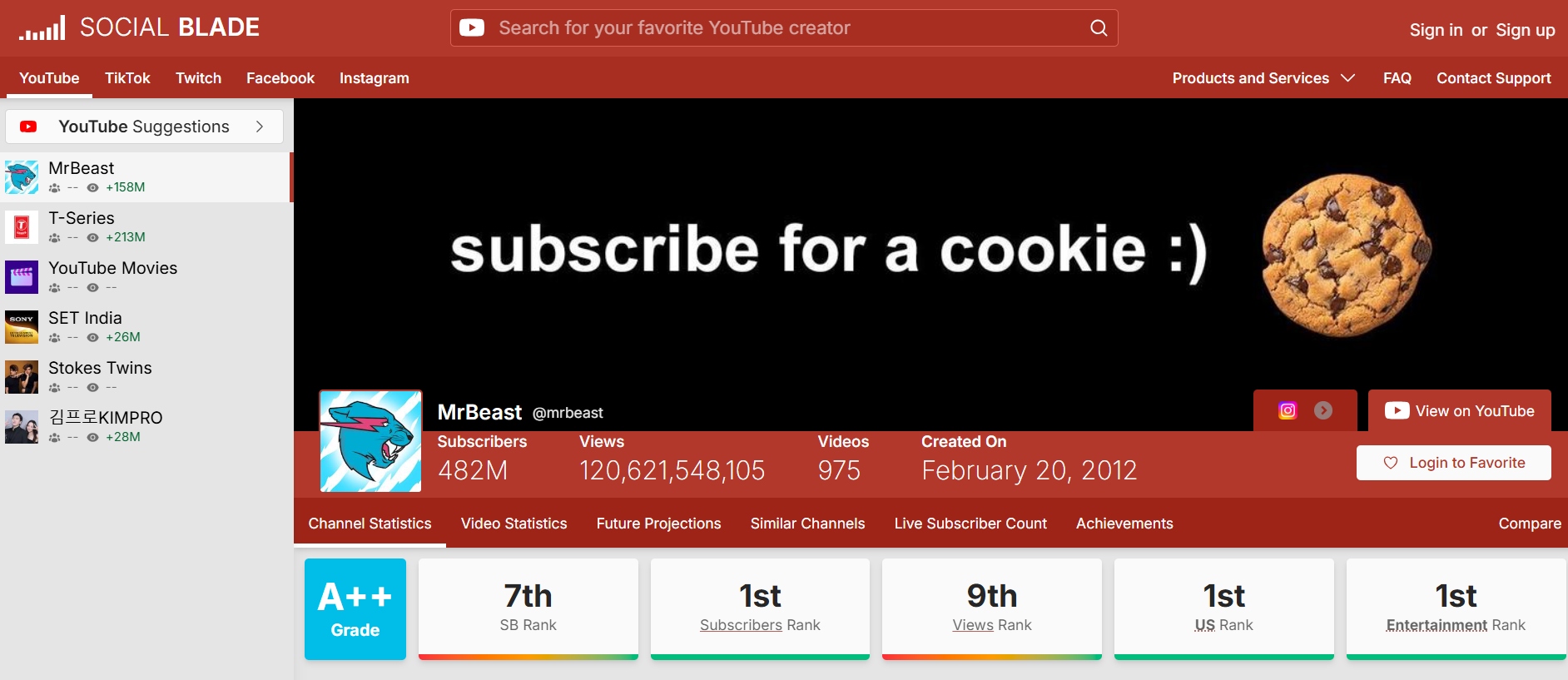
Want deeper analytics? Hit the Social Blade link embedded in the extension’s panel, and jump directly to that channel’s Social Blade profile for a deep dive into subscriber counts, estimated earnings, and engagement trends.
5. Channel Video History Viewer
See every video a channel has uploaded in chronological order—handy for spotting growth patterns, identifying popular content types, or understanding publishing frequency without leaving YouTube.
6. Live Subscriber & Monetization Panel
Keep an eye on a channel’s live subscriber count and monetization badge right on their profile page. No need for external dashboards—everything updates in real time.
Who’s It For?
- Content Creators who want to benchmark themselves against monetized competitors and research highly-ranked video tags.
- Agencies & Marketers scouting influencers, gauging ad-driven channels, and exploring SEO strategies.
- Viewers curious about the inner workings and transparency of their favorite channels.
- Researchers & Analysts tracking trends in creator monetization and content strategy.
How to Get Started
- Install: Head to the Chrome Web Store and add YouTube Monetization Checker to your browser.
- Navigate: Open any YouTube channel or video page.
- Click & Discover:
- Hit “Check Monetization” to see if ads are enabled.
- Use “Extract SEO” to pull the video’s hidden tags and metadata.
- Use “Convert Shorts” to switch to the full video format.
- Click the Social Blade icon for deeper stats.
Why This Extension Stands Out
When it comes to analyzing YouTube channels efficiently, not all tools are created equal. Many creators still rely on manual checks or slow third-party websites—but with this extension, everything happens in one click.
- Instant Metadata & Monetization Detection: Other tools may delay or fail to show information. This extension shows it live, right on the page.
- All-in-One Hub: You no longer need to dig through multiple tabs. The extension gives you integrated access to Social Blade, video history, SEO extraction, and Shorts conversion.
- Lightweight Design: Whether you’re researching for a brand deal or sizing up a competitor, this extension lets you act fast without slowing down your browser.
Privacy & Security
You care about your data, and so does this extension. It’s built to be privacy-friendly:
- No personal data collected: It only reads publicly available information that’s already on YouTube or Social Blade.
- Lightweight & Fast: It loads instantly without hogging system resources.
- Transparent Permissions: The extension requires minimal permissions—just enough to read the page you’re viewing and display the extra information you want, nothing more.
How YouTube Monetization Works (and What the Checker Tells You)
A channel earns ad revenue after it joins the YouTube Partner Program (YPP). To qualify for ad revenue sharing, a channel generally needs 1,000 subscribers plus either 4,000 valid public watch hours in the last 12 months or 10 million valid public Shorts views in the last 90 days. YouTube also offers an earlier tier with lower thresholds that unlocks fan-funding features such as memberships and Super Thanks, but not ad revenue. Requirements can change, so confirm them in YouTube's help pages.
The checker reads signals YouTube already exposes on public pages. Keep in mind:
- A monetized channel may still have videos without ads. Videos can be demonetized individually, age-restricted or claimed by a copyright owner.
- Status can change. Channels can be removed from YPP for policy reasons, so check again before an important decision.
- It does not reveal earnings. Revenue figures on Social Blade and similar sites are rough estimates based on views, not real payouts.
What Video Tags Really Do for YouTube SEO
YouTube's own guidance says tags play a minimal role in discovery. They mainly help when your topic is often misspelled. Copying a competitor's tags will not copy their rankings.
Use the extracted data more wisely:
- Study titles first. Look at how top videos phrase the main query, where they put the keyword and how long their titles are.
- Read the descriptions. The first two lines show above the fold and often repeat the main keyword naturally.
- Spot topic clusters in tags. Tags can reveal related subjects a creator is targeting, which may give you new video ideas.
- Focus on what drives rankings: click-through rate from a strong thumbnail and title, and watch time from a video that delivers on its promise.
A Quick Competitor Research Routine
- Search your main topic on YouTube and open five channels that rank well.
- Use the extension to confirm which are monetized, and note their subscriber counts.
- Open the upload history to see how often they post and which videos stand out against their usual views.
- Extract titles and tags from those outlier videos and note the common themes.
- Plan your own videos around the gaps: angles, formats or questions that none of them cover well.
FAQs
Is the YouTube monetization checker extension free to use?
Yes! This lightweight tool is completely free and installs from the Chrome Web Store in seconds.
Does this extension extract hidden YouTube tags?
Absolutely. The new Video SEO Details Extractor allows you to instantly uncover the exact tags, keywords, and metadata any public YouTube video is using to rank.
Does this extension work on any YouTube channel?
Yes. Whether it’s your own channel or someone else’s, the extension shows monetization status, tags, and other insights as long as the content is public.
Can it help me grow my own YouTube channel?
Indirectly, yes. By using the extension to study successful, monetized channels and studying the titles, descriptions and tags they use, you can model your content strategy after what already works.
Final Thoughts
The YouTube monetization checker extension is more than just another Chrome add-on—it’s a compact, all-in-one toolkit that saves you time and gives you actionable insights on any channel, right where you need them. Whether you’re reverse-engineering SEO for your next big video series or scouting out influencer partnerships, installing this extension is one of the easiest ways to level up your YouTube game.